If you’ve ever worked on a small-scale rooftop solar project or a large utility-scale array, you know that the solar panels are only the start. The cables that carry direct current (DC) power from those panels to the inverter and battery bank are the unsung heroes of the system—get them wrong, and you’re looking at reduced efficiency, safety risks, or even a system that fails entirely. After five years as a solar DC cables supplier, I’ve seen every mistake in the book: undersized cables stretching too tight across a roof, exposed wiring hidden behind trim, poor connections that corrode in the sun. That’s why I’m breaking down the proper way to install solar DC cables, straight from the knowledge I pass to every customer who buys our cables. No jargon, no fancy AI tricks, just real-world lessons from working with installers and homeowners every day. Solar DC Cables
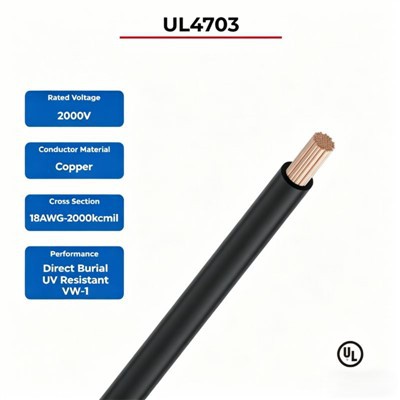
First, let’s start with why this matters. Solar DC cables aren’t the same as the electrical wire in your house. They’re built to withstand ultraviolet (UV) radiation, extreme temperatures (think 180°F on a summer roof), and constant bending. When you install them wrong, even the best cables won’t perform. I’ve had customers come back three months after their install saying their system is underperforming—turns out they used standard indoor wire instead of our solar DC cables, and the plastic insulation degraded in the sun. That’s a $1,000 mistake that’s 100% avoidable.
Step one: Pick the right cable for your project. This isn’t “one size fits all.” The National Electrical Code (NEC) and International Electrotechnical Commission (IEC) set standards for solar cables, and following them isn’t optional. First, check the voltage of your panels. Most residential panels are 300 to 400 V DC, while commercial arrays can go up to 1,000 V DC, and some utility systems are even 1,500 V DC. Our solar DC cables are rated for these exact ranges, but you have to match the cable’s voltage rating to your system—never use a lower-rated cable. Next, the size, measured in American Wire Gauge (AWG) or square millimeters (mm²). This depends on two things: the distance between your panels and the inverter, and the current your system produces. Longer runs mean more voltage drop, which is energy lost. For example, a 15 ft run for a small residential array can use 10 AWG cable, but a 50 ft run needs 8 AWG, and a 100 ft run needs 6 AWG. If you go too small, you’ll lose 5% or more of your power every year. I always tell customers: it’s better to size up than down. We’ve had installers save a few bucks on cable, only to have to replace it a year later because of voltage drop. That’s not a win for anyone. Also, make sure the cable is listed—UL-listed for North America, TÜV-rated for Europe. Cut-rate unlisted cables might seem cheap, but they don’t meet fire safety or durability standards. I’ve seen unlisted cables melt when exposed to rooftop heat, which is a huge fire risk.
Once you have the right cable, it’s time for layout. This is where I see a lot of installers rush. First, plan the route before you cut anything. The shortest path isn’t always the best—you need to avoid sharp edges, sharp metal, and areas where the cable can be pinched. Sharp edges (like roof flashing or mounting brackets) can tear the insulation over time, letting water in or exposing the conductors. I always recommend using rubber grommets when running cables through holes in the roof—this is a cheap part that saves you from replacing a whole cable later. Also, keep cables away from hot surfaces. If your roof has a metal rack that gets to 150°F on a sunny day, don’t run the cable directly on it. Leave a little space, or use cable trays to lift it away. Another big no-no: don’t bundle too many cables together. If you cram 10 DC cables into a tight bundle, they can trap heat, which speeds up insulation degradation. NEC recommends limiting bundle size to keep the temperature under the cable’s rating. Our solar DC cables are built to handle high heat, but even the best ones don’t like being trapped. Also, never run DC cables in the same conduit as AC cables. That can cause electrical interference and is a safety hazard. Keep them separate, either in their own conduits or run along separate paths on the roof.
Next, handling and cutting the cable. Solar DC cables have two conductors: usually red for positive and black for negative. These conductors are solid copper, which is great for conductivity but can be stiff if you bend it too much. I tell installers to never bend the cable tighter than a 6-inch radius. Bending it too sharp can crack the conductor or damage the insulation. When cutting, use a cable cutter made for copper—don’t use wire cutters for aluminum, or scissors, which can fray the conductors. Frayed conductors cause higher resistance, which means more voltage drop and can even lead to overheating at the connection point. Once you cut the cable, strip the insulation carefully. Don’t strip more insulation than you need—usually about ¼ to ⅜ of an inch. Stripping too much exposes too much conductor, which can cause a short circuit when you connect it. If you strip too little, the connector won’t clamp properly, leading to a loose connection that can arc. Arcing is a big safety risk—it’s what causes most solar system fires. I always advise taking your time here; rushing stripping is where most mistakes happen.
Connecting the cables is the most critical part of the install. The connectors for solar DC cables are standardized—we use MC4 connectors, which are the industry standard for almost all applications. Never use mismatched connectors, and never reuse connectors. When you crimp the conductor to the connector terminal, use a crimping tool made for the specific connector. A bad crimp is one of the top causes of system failures. I’ve seen installers use pliers to crimp because they don’t want to buy the right tool, and six months later the connection comes loose. To test a good crimp: tug on the wire gently after crimping—if it moves, you need to redo it. Once you crimp, insert the connector into the mating part until you hear a click. Then, tug on it gently to make sure it’s locked. Never force a connector—if it doesn’t go on, check for dirt or debris in the locking tab. Also, don’t leave exposed connectors hanging. If you have an extra length of cable after connecting, cap it with a weatherproof connector end until you’re ready to connect it to the next part. Water in connectors is another common issue. Even if they’re rated for outdoor use, if you don’t lock them properly or seal them, water can get in and cause corrosion, which increases resistance over time.
Running the cables through conduits or trays? That’s part of the install too. If you’re using conduits, use flexible PVC or metal conduits rated for outdoor use. For metal conduits, make sure they’re grounded properly to avoid electrical shock risks. When pulling cables through conduits, use a pull string, and never pull too hard. Pulling too hard can stretch the conductor, which weakens it over time and increases resistance. Also, leave a little slack at the ends—about 1 to 2 feet at the panels and inverter, so you can adjust or replace parts later without having to cut and reconnect the entire cable run. That’s a tip I learned early on: extra slack saves you from a lot of headaches when you need to service your system.
Testing is non-negotiable before you turn the system on. Once all the cables are connected, use a multimeter to check for voltage. Make sure the voltage is in line with your system’s rating—if it’s way higher or lower, you have a loose connection or a wrong cable size. Also, check for continuity: make sure there are no breaks in the conductor. If you get a reading of infinite resistance, you have a cut or frayed cable that needs to be fixed. Another test: check for any shorts between the positive and negative conductors. Touch the multimeter leads to the positive and negative cables—if you get a low resistance reading, that’s a short, which is a safety hazard. Fix any issues before turning the inverter on.
Now, maintenance after install. This is part of proper installation too, because even the best install can go wrong if you don’t check the cables. Every six months, visually inspect the cables: look for cracks in the insulation, loose connectors, or discoloration, which can mean overheating. Check that the grommets are still in place, and that the cables aren’t rubbing against any metal parts. If you notice any issues, fix them right away—small problems turn into big ones fast.
As a solar DC cables supplier, I’ve seen how a small mistake in install can ruin a system. I’ve had homeowners tell me their installers cut corners on the cables, and now their system is producing 20% less power than it should. That’s not just lost money—it’s a safety risk. The good news is that proper installation isn’t complicated. It’s about taking the time to pick the right cable, plan the layout carefully, make clean cuts and crimps, test everything, and do regular checks after install.
If you’re working on a solar project, big or small, and you need reliable solar DC cables that meet all industry standards, or if you have questions about sizing, layout, or connectors, reach out to our team. We work with installers and homeowners all over, and we don’t just sell cables—we share the lessons we’ve learned from thousands of projects to help you get it right. Don’t leave your solar system’s performance and safety to chance; get the right cables and install them the right way.
Home Battery References
- National Electrical Code (NEC) Article 690: Solar Photovoltaic Systems
- International Electrotechnical Commission (IEC) 62930: Photovoltaic System Cables – Requirements and Test Methods
- Solar Energy Industries Association (SEIA): "Best Practices for Solar DC Cable Installation and Maintenance"
Tianjin Xilingke New Energy Technology Co., Ltd.
As one of the most professional solar dc cable manufacturers and suppliers in China, we’re featured by quality products and low price. Please rest assured to wholesale durable solar dc cable made in China here from our factory. For quotation, contact us now.
Address: Suite 2601, Tower B, Wanghai International, Haihe East Road, Hebei District, Tianjin, China.
E-mail: robin@sinelinkev.com
WebSite: https://www.sinelinkenergy.com/
